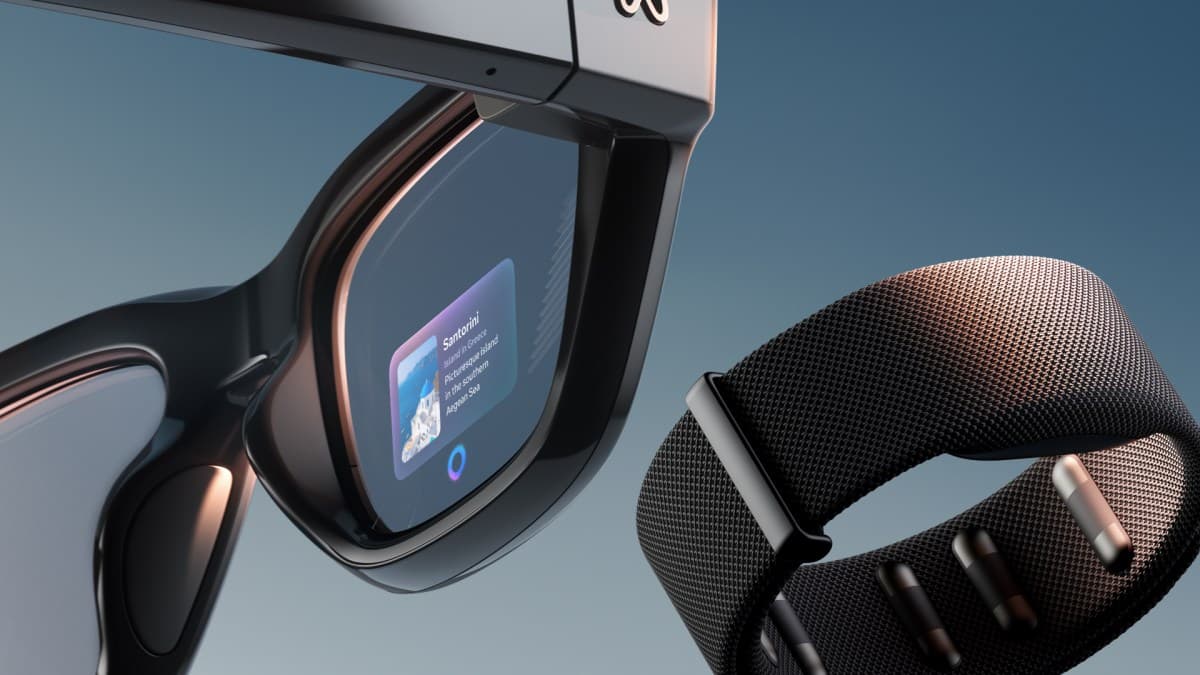
Meta Ray-Ban Display apps: what you can use on the lens
Meta Ray-Ban Display adds a small full-colour screen to the right lens and comes with the Meta Neural Band, a wristband that reads finger gestures. Apps don't install on the glasses. Meta's own features (messaging, video calls, walking directions, captions, music controls) appear on the lens through the Meta AI phone app. Third-party apps are in developer preview through Meta's Wearables Device Access Toolkit.
- Display
- Monocular HUD
- Field of view
- About 20°
- Input
- Meta Neural Band (EMG wristband), voice, touchpad
- Where apps come from
- Meta's built-in apps through the Meta AI app; third-party apps in developer preview
How to get apps on Meta Ray-Ban Display
Pair the glasses in the Meta AI app on iPhone or Android, then link WhatsApp, Messenger, Instagram and Spotify under App Connections. There is no public app store for the display yet.
5 apps verified

Meta AI
Meta's official companion app for setting up and managing Ray-Ban Meta glasses and their AI assistant.

Spotify
Stream music, playlists and podcasts on Ray-Ban Meta glasses by voice.

Make hands-free WhatsApp voice and video calls from Ray-Ban Meta glasses.

Messenger
Make hands-free Messenger voice and video calls from Ray-Ban Meta glasses.

Share photos, videos and live streams to Instagram directly from Ray-Ban Meta glasses.
Common questions
Can you download apps on Meta Ray-Ban Display?+–
Not yet. Meta's built-in apps come with the glasses, and outside developers can only build for the display in Meta's developer preview.
Does Meta Ray-Ban Display work with WhatsApp?+–
Yes. Meta lists reading and replying to WhatsApp, Messenger and Instagram messages, and video calls on all three.
Does Meta Ray-Ban Display have maps?+–
Yes. Meta lists turn-by-turn walking directions with a visual map on the lens, now across the US.
What is the Meta Neural Band?+–
A wristband that reads small muscle signals in your wrist, so you scroll, click and type with finger gestures instead of touching the glasses.